

Introduction
In 2026, choosing the right accounting software is more critical than ever. Small businesses, freelancers, and growing companies rely heavily on cloud accounting platforms to manage finances efficiently, track cash flow, and make data-driven decisions. Two of the most popular options in the market are Xero and Zoho Books.
Both tools offer cloud-based accounting solutions, but they cater to slightly different audiences. Xero is renowned for its intuitive design, unlimited users, and strong integrations, making it a favorite for small to mid-sized businesses. Zoho Books, on the other hand, is part of the larger Zoho ecosystem, offering tight integration with CRM, project management, and inventory tools, which is especially appealing to tech-savvy businesses and freelancers.
Choosing the wrong platform can cost both time and money. Many businesses start with one system only to realize later that it doesn’t meet their reporting, invoicing, or inventory needs. That’s why understanding the strengths, weaknesses, and real-world applications of Xero and Zoho Books is essential before making a commitment.
In this article, we’ll break down features, pricing, integrations, security, and more, giving you a comprehensive comparison that helps you decide which platform fits your business perfectly in 2026.
2. Xero vs Zoho: Quick Verdict
If you’re short on time, here’s a quick breakdown:
Who Should Choose Xero:
- Small to medium businesses looking for easy collaboration with accountants
- Companies needing unlimited users without extra cost
- Businesses that want simple invoicing, bank reconciliation, and reporting
Who Should Choose Zoho Books:
- Freelancers and startups looking for budget-friendly options
- Businesses already using Zoho CRM, Zoho Projects, or other Zoho apps
- Teams that need automation and multi-platform integration
Summary:
Xero shines in simplicity, speed, and unlimited user collaboration, making it perfect for service-based businesses and small teams. Zoho Books offers affordable pricing, strong automation, and ecosystem integrations, which is ideal for tech-savvy startups and businesses using multiple Zoho apps.
This section is perfect for a featured snippet, allowing busy readers to immediately identify which platform suits their needs.
3. What is Xero?
Overview:
Xero is a cloud-based accounting platform designed for small and medium-sized businesses. It focuses on ease of use, collaboration, and automation, helping businesses track finances, manage invoices, and reconcile accounts efficiently.
Core Features:
- Invoicing and online payments
- Bank reconciliation with automated feeds
- Expense tracking
- Financial reporting and dashboards
- Multi-currency support
- Payroll integration (in supported regions)
Pros & Cons:
- Pros: Intuitive interface, unlimited users, robust integrations, mobile app for on-the-go accounting
- Cons: Payroll limited to certain regions, reporting not as customizable as some competitors
Best Use Cases:
- Service-based businesses with multiple team members
- Companies that collaborate closely with accountants
- Businesses that want a clean, minimal learning curve
Example:
A small marketing agency can use Xero to invoice clients, track expenses, and reconcile bank accounts without needing complex setup or training.
4. What is Zoho Books?
Overview:
Zoho Books is part of the Zoho suite, offering cloud-based accounting tools for freelancers, startups, and small businesses. It focuses on affordability, automation, and ecosystem integration, especially for businesses already using other Zoho applications.
Core Features:
- Invoicing and payment collection
- Expense tracking and recurring transactions
- Automated workflows and reminders
- Inventory management
- Integration with Zoho CRM, Projects, and Inventory
- Multi-currency support
Pros & Cons:
- Pros: Affordable, strong automation, seamless Zoho ecosystem integration, mobile app
- Cons: Limited third-party integrations compared to Xero, slightly steeper learning curve for beginners
Best Use Cases:
- Freelancers managing clients and projects
- Startups using Zoho CRM or other Zoho apps
- Small eCommerce businesses needing inventory and invoicing
Example:
A freelance designer using Zoho Books can automate client invoice reminders, link with Zoho CRM, and track payments efficiently without manual follow-up.
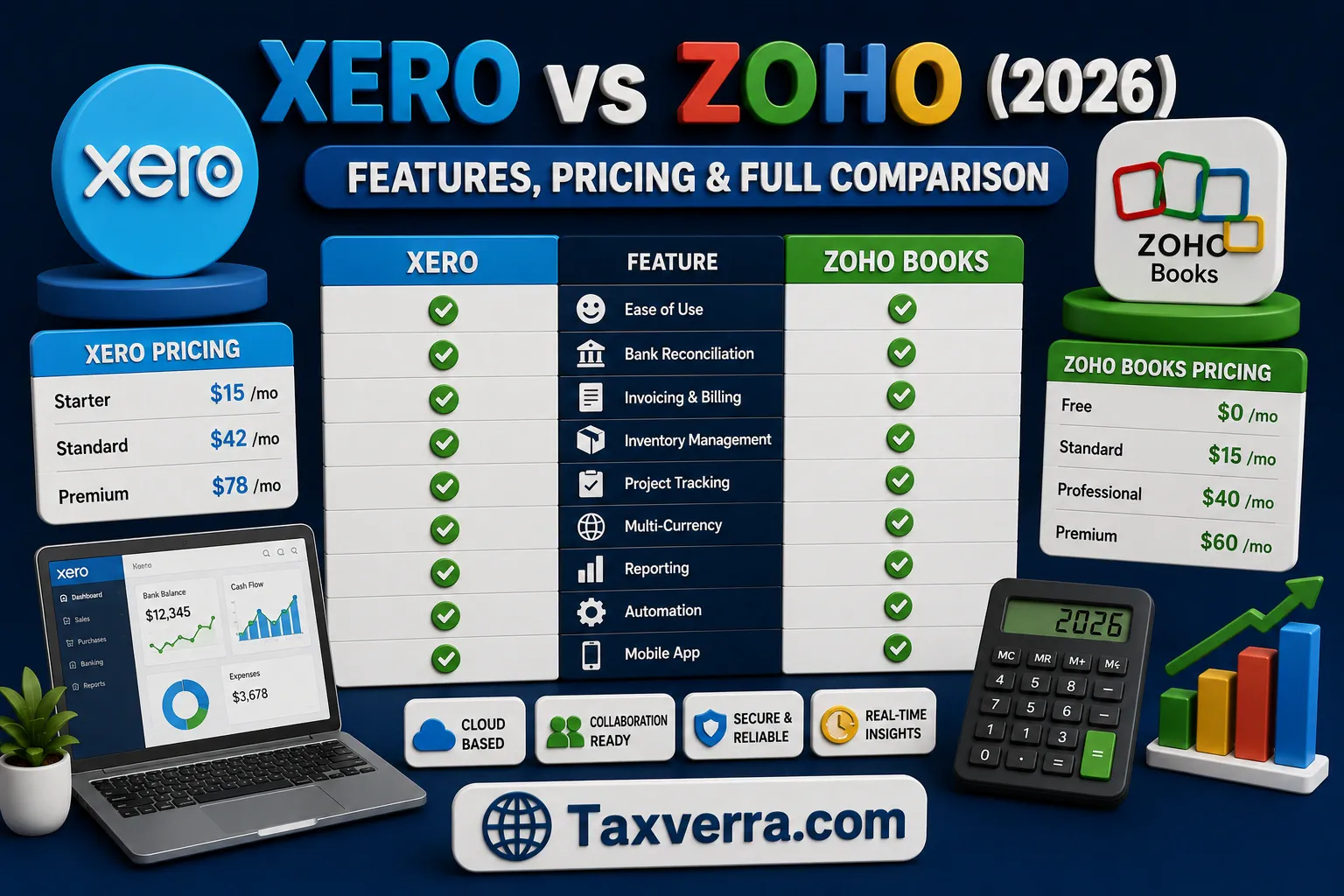
5. Xero vs Zoho: Key Differences at a Glance
| Feature | Xero | Zoho Books |
|---|---|---|
| Pricing | Slightly higher, unlimited users | Budget-friendly, user-based pricing |
| User Limit | Unlimited | Tiered per plan |
| Integrations | 1200+ apps | Strong within Zoho ecosystem |
| Mobile App | Robust, intuitive | Functional with automation |
| Automation | Limited compared to Zoho | Strong workflow automation |
| Reporting | Standard, easy-to-read | Customizable, slightly complex |
| Inventory | Basic | Advanced for Zoho Inventory users |
Key Insight:
- Xero is ideal for simplicity and collaboration
- Zoho Books is better for automation and integrated workflows
6. Feature-by-Feature Comparison (Deep Dive)
6.1 Dashboard & User Experience
Xero’s dashboard is known for its clean, intuitive layout. Users can quickly view bank balances, overdue invoices, expenses, and cash flow snapshots. Everything is drag-and-drop and highly visual, which is helpful for small business owners who aren’t accounting experts. The interface also supports multiple users simultaneously, making collaboration with accountants seamless.
Zoho Books, while slightly more complex, offers a customizable dashboard that can display charts, graphs, and key performance indicators. It integrates with other Zoho apps, so businesses can see invoices, payments, and project status in one place.
Example: A small consulting firm uses Xero to track weekly cash flow at a glance, while another using Zoho can integrate CRM data directly into the dashboard for client tracking.
6.2 Invoicing & Payments
Xero provides professional invoice templates, automated reminders, and multiple payment gateways. It supports recurring invoices and batch payment features, reducing manual follow-ups.
Zoho Books also offers automated invoicing, recurring billing, and multi-currency support. One standout is Zoho’s automation rules, which can send reminders or apply late fees without manual input.
Example: A freelancer using Zoho can automatically invoice clients every month and receive notifications when payments are overdue, saving hours of administrative work.
6.3 Expense & Receipt Management
Xero allows users to capture receipts via the mobile app and categorize expenses automatically. Integration with bank feeds ensures real-time tracking.
Zoho Books offers similar features but adds AI-powered expense categorization and customizable approval workflows. This is useful for businesses with multiple team members submitting expenses.
Example: A small marketing agency uses Zoho to route team expenses for approval, ensuring no duplicate or unapproved spend slips through.
6.4 Bank Reconciliation
Bank reconciliation is one of Xero’s strongest points. Automated feeds pull transactions and match them with invoices and bills.
Zoho Books also supports automated reconciliation but shines when combined with Zoho Payments and Zoho Inventory, giving a more complete financial picture.
Example: A retail business using Xero reconciles all transactions in minutes instead of hours, while a Zoho user links payments and inventory for real-time profit tracking.
6.5 Inventory Tracking
Xero provides basic inventory management, suitable for service businesses or companies with limited stock.
Zoho Books offers advanced inventory features through Zoho Inventory, including multi-location stock, order management, and stock alerts.
Example: An eCommerce startup uses Zoho to track products across two warehouses and automatically updates sales orders.
6.6 Payroll & Employee Management
Xero includes payroll for supported regions, with leave management and payslip generation. It’s simple but not global in reach.
Zoho Books integrates with Zoho People for payroll and HR management, which is great for growing teams.
Example: A startup in the US uses Xero payroll for employees, while a multi-country company integrates Zoho Books with Zoho People for payroll and attendance.
6.7 Financial Reporting
Xero offers standard reports like P&L, balance sheet, and cash flow statements. Reporting is simple but slightly less customizable.
Zoho Books provides advanced customizable reports, drill-downs, and analytics dashboards, especially when linked with other Zoho apps.
Example: A business using Zoho Books generates detailed sales reports by region and integrates them with Zoho Analytics for strategic insights.
6.8 Automation & AI Features (2026 Trend)
Xero automates bank feeds, recurring invoices, and transaction categorization.
Zoho takes automation further with AI-powered workflows, smart categorization, and automated follow-ups.
Example: A freelancer using Zoho can automatically categorize expenses, trigger reminders for unpaid invoices, and sync project data across apps.
6.9 Multi-Currency Support
Xero supports over 160 currencies with automatic exchange rates, ideal for businesses working internationally.
Zoho Books also supports multi-currency but is best for small international operations due to slightly limited exchange rate updates.
Example: An export business using Xero invoices clients in USD, EUR, and GBP, with real-time exchange rate updates.
7. Pricing Comparison (2026 Updated)
Plan Breakdown:
- Xero: Starter, Standard, Premium; unlimited users included
- Zoho Books: Basic, Standard, Professional; pricing tiered by users
Hidden Costs & Add-Ons:
- Xero may charge for payroll or premium integrations
- Zoho Books may require Zoho Inventory or CRM add-ons for full functionality
Value for Money:
- Xero is cost-effective for unlimited team members and collaboration
- Zoho Books is ideal for single-user or small teams, especially those using Zoho ecosystem apps
Example: A small agency saves on Xero’s unlimited users plan, while a solo freelancer finds Zoho Books more budget-friendly.
8. Xero vs Zoho: Pros and Cons
| Feature | Xero | Zoho Books |
|---|---|---|
| Dashboard | Clean, simple, collaborative | Customizable, integrates with Zoho apps |
| Invoicing | Automated, multiple gateways | Automated with smart rules |
| Expense Management | Capture receipts, auto-categorize | AI-powered categorization, approval workflows |
| Bank Reconciliation | Automated, fast | Automated with Zoho Payments integration |
| Inventory | Basic | Advanced with Zoho Inventory |
| Payroll | Limited regions | Zoho People integration for global teams |
| Reporting | Standard, easy-to-read | Customizable, detailed analytics |
| Multi-Currency | 160+ currencies | Supported, but slightly limited |
9. Ease of Use & Setup Comparison
- Beginner Friendliness: Xero is easier for first-time users; Zoho has a steeper learning curve but is powerful once set up.
- Setup Time: Xero setup takes minutes for basic accounting; Zoho requires configuration if integrated with CRM or Inventory.
- Learning Curve: Xero is intuitive; Zoho offers more features but requires time to master workflow automation.
10. Integrations & App Ecosystem
- Number of Integrations: Xero supports 1,200+ third-party apps; Zoho excels within its own ecosystem with seamless cross-app integration.
- Key Tools Supported: Xero works with payment gateways, CRMs, and reporting tools. Zoho integrates with Zoho CRM, Zoho Projects, Zoho Inventory, and other apps.
- Flexibility: Xero is versatile for various industries; Zoho is ideal if you rely on the Zoho ecosystem for multiple business functions.
11. Mobile App Experience
Both Xero and Zoho Books offer robust mobile apps, giving business owners access to accounting tools on the go.
Mobile Usability:
Xero’s mobile app is intuitive and user-friendly, allowing users to view dashboards, track bank transactions, and manage invoices with minimal navigation. Zoho Books also offers a feature-rich mobile experience, though the interface can feel slightly more complex due to extensive automation options.
Features Available on Mobile:
- Xero: Invoicing, expense tracking, bank reconciliation, dashboard view, and real-time notifications.
- Zoho Books: Invoicing, recurring bills, expense capture with receipt scanning, workflow automation, and multi-currency support.
Real-World Usability:
For a freelancer on the go, Xero’s app allows instant invoice creation after client meetings. A small eCommerce business using Zoho Books can manage inventory and payments directly from the warehouse floor.
12. Customer Support & Community
Support Channels:
Xero offers live chat, email, and a large online help center. Zoho Books provides email support, chat, and extensive documentation.
Availability:
Xero’s support is available 24/7 for online resources; live chat may have business hours. Zoho Books also provides robust self-service help and community forums.
Help Resources:
Both platforms offer tutorials, webinars, and user communities. Zoho has additional benefit if using other Zoho apps, as the community shares integrated workflows and use cases.
13. Security & Data Protection
Data Encryption:
Both Xero and Zoho Books use AES-256 encryption, keeping financial data secure.
Backup Systems:
Automatic cloud backups are standard. Xero stores data redundantly across multiple locations; Zoho Books integrates backups within the Zoho Cloud ecosystem.
Compliance:
Xero is compliant with ISO 27001 and local data protection laws. Zoho Books meets GDPR standards and provides compliance features for international users.
14. Performance & Reliability
Speed & Stability:
Xero loads quickly even with large datasets. Zoho Books can be slightly slower when multiple integrations are active.
Downtime History:
Both platforms maintain high uptime (~99.9%), with scheduled maintenance announced in advance.
System Reliability:
For small businesses, either platform provides a reliable accounting environment, but Zoho Books’ multi-app ecosystem may occasionally require updates across apps.
15. Xero vs Zoho for Different Business Types
Freelancers: Zoho Books’ automation and lightweight plans are ideal.
Small Businesses: Xero’s intuitive dashboards and unlimited users are perfect for collaborative teams.
Growing Companies: Zoho Books + Zoho Inventory integration supports scaling operations with complex workflows.
eCommerce Businesses: Zoho excels for multi-location inventory and integration with Zoho CRM, while Xero works well for simple stock management.
16. Real-Life Case Study
Business Using Xero: A marketing agency tracks cash flow, manages invoices, and reconciles banks daily, reducing manual hours by 70%.
Business Using Zoho Books: A small eCommerce startup uses Zoho Books + Zoho Inventory to manage stock across two warehouses, automate invoices, and track payments efficiently.
Results Comparison: Xero saves time on collaboration and reporting, while Zoho improves workflow automation and inventory accuracy.
17. Switching Between Xero and Zoho
Data Migration Process:
Both platforms offer CSV imports and integration tools for moving invoices, contacts, and accounts.
Common Challenges: Mapping chart of accounts and adjusting tax settings can be tricky.
Tips for Smooth Transition:
- Backup all data before migration.
- Test with a small dataset first.
- Plan downtime to avoid business disruption.
18. Common Mistakes to Avoid When Choosing
Wrong Decision Factors:
- Choosing solely based on price.
- Ignoring integration needs or scalability.
Practical Advice:
- Consider team size, business type, and future growth.
- Evaluate mobile app usability, automation, and ecosystem integration.
19. Expert Tips
Hidden Features: Zoho Books offers advanced workflow automation; Xero allows unlimited collaboration for teams.
Cost-Saving Tips: Use Zoho Books for single users to save on subscription fees; Xero works best for teams to avoid additional user charges elsewhere.
Accountant Recommendations: Many accountants recommend Xero for standard bookkeeping simplicity, and Zoho Books for tech-driven automation and multi-app ecosystems.
20. Alternatives to Xero & Zoho
Other Tools: QuickBooks, Wave, Sage Business Cloud.
When to Consider Alternatives:
- QuickBooks: If you need a mature US-based ecosystem with strong payroll.
- Wave: Free accounting for freelancers.
- Sage: Large-scale operations needing complex reporting.
21. Final Verdict: Which One Should You Choose?
Choosing between Xero and Zoho Books ultimately depends on your budget, business size, and workflow needs.
Based on Budget:
- Zoho Books is ideal for small teams, freelancers, and startups looking for a cost-effective solution. Its tiered pricing and automation options offer great value without compromising essential accounting features.
- Xero, while slightly higher in cost, is a better investment for businesses that require unlimited users and a simple collaborative accounting environment.
Based on Business Size:
- Freelancers and micro-businesses: Zoho Books is perfect for solo operations or businesses already using other Zoho apps.
- Small to medium teams: Xero shines in collaborative settings, with multiple users, seamless reporting, and intuitive dashboards.
- Growing companies or eCommerce businesses: Zoho Books integrated with Zoho Inventory and CRM can handle more complex workflows as your business scales.
Based on Ease of Use:
- Xero is more beginner-friendly, offering an intuitive interface, easy onboarding, and straightforward reporting.
- Zoho Books offers more automation and customization, which is powerful but requires a short learning curve.
Summary Recommendation:
- If simplicity and collaboration matter most → Xero
- If cost, automation, and integration with other tools matter → Zoho Books
22. FAQs (SEO Gold Section)
1. Is Xero better than Zoho Books?
- Xero is better for collaboration, unlimited users, and simplicity, while Zoho Books excels in automation, affordability, and ecosystem integration.
2. Can Zoho Books replace Xero for small businesses?
- Yes, especially for startups or freelancers using Zoho’s ecosystem, but Xero may be better for teams needing real-time collaboration.
3. Which software is cheaper in 2026?
- Zoho Books generally offers lower subscription costs, especially for solo users, whereas Xero’s pricing is slightly higher but includes unlimited users.
4. Can I migrate from Xero to Zoho Books easily?
- Yes, both platforms allow CSV imports and migration tools, though mapping chart of accounts and tax settings may require attention.
5. Does Zoho Books have mobile app support?
- Yes, Zoho Books mobile app supports invoicing, expense tracking, multi-currency, and workflow automation.
6. Which is better for eCommerce businesses?
- Zoho Books, when paired with Zoho Inventory, offers more robust inventory tracking and order management features.
7. Do both platforms support multi-currency transactions?
- Yes, both Xero and Zoho Books support multi-currency, but Xero updates exchange rates automatically for over 160 currencies.
23. Conclusion + Action Step
In 2026, both Xero and Zoho Books are excellent cloud accounting solutions, but your choice depends on your business needs, team size, and workflow preferences.
- Choose Xero if you want simplicity, unlimited users, and fast setup, ideal for small to medium-sized collaborative teams.
- Choose Zoho Books if you prioritize automation, integration with Zoho apps, and affordability, perfect for freelancers, startups, or growing businesses needing advanced workflows.
Action Step:
- Sign up for a free trial of Xero [here] or Zoho Books [here] to explore dashboards, invoicing, and reporting firsthand.
- Evaluate mobile app usability, automation, and integrations during the trial period to ensure it fits your business.
Remember: The best accounting software is the one that saves you time, reduces errors, and grows with your business.

