

Choosing the right accounting software in 2026 isn’t just a setup decision, it directly affects how your business runs every day. A lot of business owners look at their reports and see profit, but still struggle to pay bills on time or manage cash flow. That disconnect usually comes from poor tracking, delayed updates, or using a system that doesn’t match how the business actually operates.
For example, imagine you run a small service business. You send invoices manually, track expenses in spreadsheets, and check your bank once a week. Everything looks fine until a big expense hits and you realize your numbers weren’t up to date. This is where proper accounting software changes everything.
When comparing Xero vs QuickBooks, most people focus on features or pricing. But the real question is: which one makes your daily work easier? Can you quickly see who hasn’t paid you? Can you reconcile your bank without confusion? Can you trust your reports when making decisions?
Both tools are powerful, but they’re built differently. One is designed to keep things simple and flexible, while the other focuses more on control and detailed reporting.
In 2026, speed and accuracy matter more than ever. Businesses are moving fast, and manual processes slow you down. The right software saves hours every week. The wrong one creates friction you deal with daily.
2. Xero vs QuickBooks: Quick Verdict
If you don’t want to go through every detail, here’s the simple breakdown.
Choose Xero if you want something that feels easy from day one. It’s a good option if you work with a team or an accountant and don’t want to worry about user limits. For example, a small marketing agency with 3–4 team members can all access Xero without extra cost, making collaboration smoother.
Choose QuickBooks if you need deeper financial insights and more structured reporting. For example, if you run a growing retail business and want detailed profit reports by product or location, QuickBooks gives you more control and clarity.
In simple terms, Xero is easier to manage daily tasks, while QuickBooks is stronger when you need detailed financial analysis.
Quick Summary:
If your focus is simplicity and teamwork → go with Xero
If your focus is reporting and financial control → go with QuickBooks
3. What is Xero?
Xero is a cloud-based accounting software built mainly for small and medium-sized businesses. It’s designed to be simple enough for non-accountants while still covering all essential financial tasks.
With Xero, you can send invoices, track expenses, connect your bank account, and generate basic financial reports. One of its biggest strengths is how easy it feels to use. You don’t need a strong accounting background to get started.
For example, a freelance graphic designer can create an invoice in minutes, send it to a client, and automatically track when it’s paid. The system updates in real time, so there’s no need to manually adjust records.
Another strong point is unlimited users. If you have a small team or work with an external accountant, everyone can access the system without increasing your cost.
Pros:
- Clean and simple interface
- Unlimited users
- Strong app integrations
Cons:
- Reporting is simpler compared to competitors
- Some features depend on region
Best for:
Freelancers, startups, and small teams that want something easy to manage without spending hours learning the system.
4. What is QuickBooks?
QuickBooks is one of the most widely used accounting platforms, especially among accountants and established businesses. It’s known for its strong reporting capabilities and structured approach to financial management.
It covers all the basics like invoicing, expense tracking, and bank reconciliation, but goes deeper when it comes to financial insights. You can generate detailed reports, track profitability, and analyze your business performance more closely.
For example, if you run an eCommerce store, QuickBooks can help you see which products are making the most profit, track cost of goods sold, and monitor overall margins. This level of detail is useful when you’re making business decisions.
The system can feel a bit complex at the beginning, especially if you’re new to accounting. But once you get used to it, it gives you more control over your financial data.
Pros:
- Advanced reporting
- Trusted by accountants
- Scales with business growth
Cons:
- Limited users on lower plans
- Slight learning curve
Best for:
Growing businesses and those who need deeper financial insights to make decisions.
5. Xero vs QuickBooks: Key Differences at a Glance
At a high level, both tools solve the same problem, but in different ways.
The main difference is how they approach usability and depth. Xero focuses on simplicity. It’s designed so you can complete tasks quickly without overthinking. QuickBooks focuses on structure and detail, giving you more control but requiring more attention.
For example, if you want to reconcile your bank transactions, Xero makes it very straightforward with a clean matching system. QuickBooks also does this well, but it gives you more options and settings, which can feel overwhelming for beginners.
Another big difference is user access. Xero allows unlimited users, which works well for teams. QuickBooks limits users unless you upgrade your plan, which can increase costs over time.
Reporting is where QuickBooks stands out. If you want detailed financial breakdowns, it gives you more flexibility. Xero keeps reports simpler and easier to understand.
Quick Comparison:
- Xero → Simple, fast, team-friendly
- QuickBooks → Detailed, structured, report-focused
So the decision really depends on how you prefer to manage your business daily.
6. Feature-by-Feature Comparison
When you go beyond surface-level features, the real differences between Xero and QuickBooks become clear. Both tools handle core accounting tasks, but the way they execute them can either save you hours or create extra work. This section breaks down each key feature with real-world context so you can see what actually matters in daily use.
6.1 Dashboard & User Experience
The dashboard is where you spend most of your time, so usability matters more than people think.
QuickBooks offers a more polished and structured dashboard with widgets, charts, and quick insights like income, expenses, and profit. It’s designed to give you a quick financial snapshot.
Xero, on the other hand, keeps things simpler. The interface is clean and less cluttered, which makes it easier for beginners to navigate.
Example:
If you log in daily just to check cash flow and outstanding invoices, Xero feels faster and less overwhelming. But if you want detailed financial visuals at a glance, QuickBooks gives you more depth.
Verdict:
- Xero → easier for beginners
- QuickBooks → better for detailed insights
6.2 Invoicing & Payments
Both tools handle invoicing well, but their approach is different.
QuickBooks provides a more all-in-one invoicing system with built-in payment processing, allowing customers to pay directly through the invoice.
Xero gives you flexibility by integrating with payment providers like Stripe and PayPal, but requires setup.
Example:
If you run a consulting business and want clients to pay instantly via card, QuickBooks makes it seamless.
If you prefer choosing your own payment provider or negotiating fees, Xero gives more flexibility.
Verdict:
- QuickBooks → smoother, faster payments
- Xero → more flexible setup
6.3 Expense & Receipt Management
Both platforms allow receipt scanning and expense tracking via mobile apps.
QuickBooks uses a receipt capture system that automatically categorizes expenses.
Xero allows you to upload receipts and match them with transactions easily.
Example:
If you travel a lot and scan receipts daily, QuickBooks may save more time with automation.
If your expenses are simple and fewer, Xero keeps things clean and manageable.
Verdict:
Very close, but QuickBooks has a slight edge in automation.
6.4 Bank Reconciliation
This is where accounting software saves the most time.
Xero is known for one-click reconciliation with smart matching suggestions.
QuickBooks also offers reconciliation, but relies more on rules and manual review.
Example:
If you have 100+ transactions daily (like an eCommerce store), Xero can significantly reduce manual work.
QuickBooks is still strong but may require more review steps.
Verdict:
- Xero → faster and simpler
- QuickBooks → more control
6.5 Inventory Tracking
Inventory is where the difference becomes obvious.
QuickBooks offers advanced inventory tracking, including cost of goods sold and stock management.
Xero provides basic inventory features, suitable for smaller operations.
Example:
If you sell physical products (Amazon, Shopify), QuickBooks is clearly better.
If you only track a few items, Xero is enough.
Verdict:
QuickBooks wins for inventory-heavy businesses.
6.6 Payroll & Employee Management
Payroll features depend heavily on region.
QuickBooks has a more complete payroll system, including tax calculations and direct deposits.
Xero offers payroll in selected regions or integrates with third-party tools.
Example:
If you have employees and want everything in one place, QuickBooks is easier.
If you already use tools like Gusto, Xero works fine.
Verdict:
QuickBooks is stronger overall.
6.7 Financial Reporting
This is one of the biggest decision factors.
QuickBooks provides more advanced and customizable reports, including forecasting and deeper analysis.
Xero offers solid reports but keeps them simpler.
Example:
If you want detailed profit analysis by product or department → QuickBooks
If you just need P&L and cash flow → Xero is enough
Verdict:
QuickBooks clearly wins.
6.8 Automation & AI Features (2026 Trend)
Automation is becoming critical in 2026.
QuickBooks uses AI (Intuit Assist) to categorize transactions and predict cash flow.
Xero focuses more on rule-based automation and is introducing conversational AI tools.
Example:
QuickBooks might automatically detect unusual expenses or suggest categories.
Xero requires you to set rules but gives more control.
Verdict:
- QuickBooks → smarter automation
- Xero → controlled automation
6.9 Multi-Currency Support
Both tools support international transactions, but Xero has an advantage.
Xero supports 160+ currencies with automatic updates.
QuickBooks offers multi-currency but only on higher plans.
Example:
If you work with international clients (freelancers, agencies), Xero is more cost-effective.
QuickBooks works well but may cost more.
Verdict:
Xero wins for global businesses.
Final Insight (Section Summary)
- Xero → best for simplicity, reconciliation, and global use
- QuickBooks → best for reporting, payroll, and automation
The real choice depends on your workflow. If you want speed and simplicity, Xero feels better. If you want control and deeper financial insight, QuickBooks is stronger.
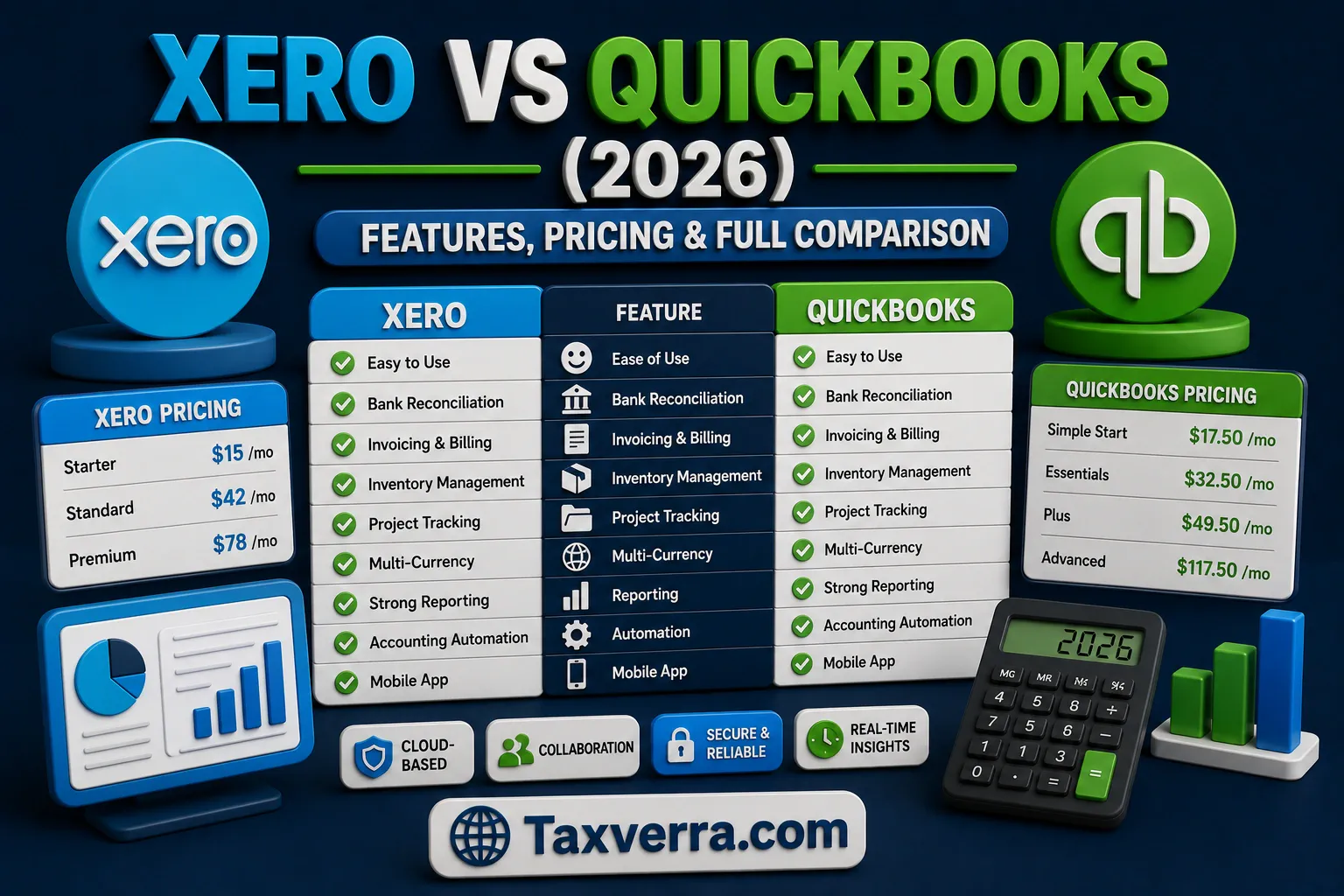
7. Pricing Comparison (2026 Updated)
Pricing is where most people make the final decision, but looking at just the monthly fee can be misleading. You need to consider users, add-ons, and how your costs grow over time.
Plan Breakdown
In 2026, Xero is generally more affordable than QuickBooks.
- Xero Plans:
- Early → around $25/month
- Growing → around $55/month
- Established → around $90/month (all with unlimited users)
- QuickBooks Plans:
- Simple Start → around $38/month (1 user)
- Essentials → around $75/month (3 users)
- Plus → around $115/month (5 users)
- Advanced → around $275/month (25 users)
Hidden Costs
This is where QuickBooks becomes more expensive.
- Payroll can add $50+ per month + per employee fees
- Payment processing fees apply
- Extra users require plan upgrades
Xero also has extra costs, but often through integrations.
Example:
A small business with 5 employees:
- QuickBooks + payroll ≈ $190+/month
- Xero + payroll integration ≈ $120–130/month
That’s a noticeable difference over a year.
Add-ons
- QuickBooks → payroll, time tracking, advanced reporting
- Xero → payroll integrations, inventory apps, payment tools
Value for Money
Xero gives more value if you have a team because users are unlimited. QuickBooks becomes expensive as you scale users and features.
Final Pricing Insight:
- Xero → better for cost control and teams
- QuickBooks → higher cost but more built-in features
8. Xero vs QuickBooks: Pros and Cons
| Category | Xero | QuickBooks |
|---|---|---|
| Ease of Use | Very simple, clean | More structured, slightly complex |
| Pricing | More affordable | More expensive as you scale |
| Users | Unlimited | Limited by plan |
| Reporting | Good, but basic | Advanced and customizable |
| Payroll | Limited / integrations | Strong built-in system |
| Inventory | Basic | Advanced |
| Automation | Rule-based | AI-driven |
| Integrations | 1,000+ apps | 700–2,000+ apps |
Example Insight:
If you’re a freelancer, most QuickBooks features may go unused, so you end up overpaying.
If you run a product-based business, Xero might feel limited in inventory.
Summary:
- Xero → simple, affordable, flexible
- QuickBooks → powerful, detailed, scalable
9. Ease of Use & Setup Comparison
Ease of use is something people underestimate until they start using the software daily.
Beginner Friendliness
Xero is clearly easier for beginners. The interface is clean, and most actions are straightforward.
QuickBooks is more structured, which is good for accountants but can feel overwhelming at first.
Example:
A freelancer setting up Xero can send their first invoice within 15–20 minutes.
With QuickBooks, it may take longer because of additional setup steps.
Setup Time
- Xero → faster setup, fewer steps
- QuickBooks → more detailed setup (accounts, tax settings, etc.)
If you want something quick to start, Xero wins.
Learning Curve
QuickBooks has a steeper learning curve but gives more control once you understand it.
Xero is easier from day one but may feel limited if your needs become complex.
Example:
A startup founder with no accounting background will feel comfortable with Xero quickly.
A finance-focused business owner may prefer QuickBooks despite the complexity.
Verdict:
- Xero → best for beginners
- QuickBooks → better for experienced users
10. Integrations & App Ecosystem
Modern businesses don’t rely on one tool. Integrations matter a lot.
Number of Integrations
- Xero → 1,000+ apps
- QuickBooks → up to 2,000+ apps depending on ecosystem
QuickBooks has a slight edge in numbers, but both are strong.
Key Tools Supported
Both integrate with:
- Payment gateways (Stripe, PayPal)
- CRM tools
- Inventory systems
- Payroll services
Example:
If you run a Shopify store, both tools can connect with your sales data automatically.
If you use third-party payroll like Gusto, Xero works very smoothly.
Flexibility
Xero is known for being more flexible with integrations. It works well if you want to build your own system using different apps.
QuickBooks is more “all-in-one,” meaning you may not need as many integrations but have less flexibility.
Example:
A tech-savvy business might prefer Xero to customize workflows.
A traditional business might prefer QuickBooks to keep everything in one place.
11. Mobile App Experience
In 2026, most business owners need to manage finances on the go. Mobile apps are no longer optional they’re critical for daily tasks like sending invoices, checking expenses, or approving payments.
Mobile Usability
Xero’s mobile app is clean and intuitive. You can create and send invoices, track expenses, and reconcile bank transactions directly from your phone. QuickBooks’ app is slightly more complex but provides more features, like detailed reporting and cash flow insights.
Features Available on Mobile
- Xero: Invoicing, receipt capture, bank reconciliation, expense approval
- QuickBooks: Invoicing, payments, bank feeds, expense tracking, advanced reporting
Real-World Example:
A freelancer working remotely can scan receipts into Xero during client visits and reconcile them immediately. A retail store owner using QuickBooks can check cash flow and approve employee expenses from their mobile app while traveling between store locations.
Verdict:
- Xero → easier and faster for basic tasks
- QuickBooks → better for users who want advanced financial control
Mobile experience is a tie overall, depending on whether you prioritize simplicity or depth.
12. Customer Support & Community
Support can make or break your experience, especially during setup or troubleshooting.
Support Channels
- Xero: Live chat, email, extensive online guides, community forums
- QuickBooks: Phone support, chat, email, community, accountants network
Availability
QuickBooks provides 24/7 chat support on higher plans, while Xero offers regional business hours support.
Help Resources
Xero has an active community forum with many tutorials, webinars, and articles. QuickBooks has a larger knowledge base and a network of certified advisors, which is useful for complex queries.
Example:
A startup founder struggling with payroll setup might find QuickBooks’ certified advisors extremely helpful. Meanwhile, a freelancer figuring out bank feeds will get quick guidance from Xero’s support articles and community.
Verdict:
- Xero → great for self-service and small teams
- QuickBooks → stronger for larger businesses needing expert advice
13. Security & Data Protection
Data security is non-negotiable in 2026. Both platforms use cloud-based infrastructure but approach security differently.
Data Encryption
- Both Xero and QuickBooks use 256-bit SSL encryption to secure data in transit.
Backup Systems
- Xero automatically backs up your data daily and stores multiple copies in geographically separated servers.
- QuickBooks Online also performs regular backups and provides version history for transactions.
Compliance
- Both platforms comply with GDPR, SOC 2, and regional financial regulations.
Example:
A small online store using Xero can confidently handle customer payment info knowing it’s encrypted and backed up. A growing SaaS company on QuickBooks can rely on audit-ready compliance features to satisfy investors or tax authorities.
Verdict:
Both tools are strong. Security shouldn’t be a deciding factor unless your business requires advanced compliance certifications, in which case QuickBooks’ enterprise-level plans may be advantageous.
14. Performance & Reliability
Reliable software means fewer disruptions and more confidence in your financial data.
Speed
- Xero is lightweight and loads quickly, even on lower-end devices.
- QuickBooks can feel heavier due to richer features but remains fast for modern devices.
Downtime
Both platforms have strong uptime records. Xero reports 99.9% uptime, and QuickBooks claims similar reliability.
System Stability
- Xero is straightforward with fewer moving parts, reducing potential errors.
- QuickBooks’ complex workflows sometimes lead to minor bugs, especially during heavy reporting tasks.
Example:
A small business reconciling dozens of bank transactions daily will find Xero quick and responsive. An accounting firm running multiple client reports simultaneously may prefer QuickBooks’ detailed features, accepting slightly longer load times.
Verdict:
- Xero → faster and simpler
- QuickBooks → more robust for complex workflows
15. Xero vs QuickBooks for Different Business Types
Choosing the right software depends on your business type and size.
15.1 Freelancers
- Xero: Ideal for simple invoicing, bank reconciliation, and expense tracking.
- QuickBooks: Overkill for most freelancers unless advanced reporting is needed.
15.2 Small Businesses
- Xero: Affordable, easy to set up, ideal for 1–10 employees.
- QuickBooks: Provides detailed insights, but costs rise with users.
15.3 Growing Companies
- Xero: Good for collaboration but may require add-ons for complex reporting.
- QuickBooks: Better for multi-department reporting, payroll, and cash flow forecasting.
15.4 eCommerce Businesses
- Xero: Works with basic inventory and payment integrations.
- QuickBooks: Superior inventory tracking, cost of goods sold, and detailed analytics.
Example:
A freelance graphic designer would likely choose Xero for its speed and simplicity, whereas a multi-location retail store would benefit more from QuickBooks’ detailed inventory and reporting features.
16. Real-Life Case Study
Seeing how businesses use Xero or QuickBooks in real life often helps clarify which tool fits best.
Business Using Xero
Consider a small digital marketing agency with 5 employees. They use Xero to handle invoicing, track project expenses, and collaborate with their accountant. The unlimited user access means both team members and the accountant can view and update transactions in real time. With automated bank feeds and easy reconciliation, they save hours each week that would otherwise be spent manually updating spreadsheets. Xero’s mobile app allows the team to approve expenses and issue invoices on the go, making cash flow management simpler.
Business Using QuickBooks
Now take a mid-sized eCommerce business selling products across multiple channels. They use QuickBooks for advanced inventory tracking, cost of goods sold, and multi-location sales reporting. QuickBooks’ detailed reporting enables them to identify which products are most profitable, forecast sales, and manage payroll efficiently. The platform’s automation and AI-driven categorization reduce errors when processing hundreds of daily transactions.
Results Comparison
- Xero → fast setup, intuitive workflow, cost-effective for small teams
- QuickBooks → robust reporting, payroll automation, ideal for scaling and complex operations
Key Insight:
If your business is small and needs simplicity → Xero works best.
If you need deep insights and structured control → QuickBooks is better.
17. Switching Between Xero and QuickBooks
Many businesses eventually wonder if switching platforms is possible. The answer is yes, but it requires planning.
Can You Migrate Easily?
Yes, both platforms support data export and import, but some processes may be manual, especially historical transactions.
Data Transfer Process
- Export your data from the old platform (customers, invoices, expenses, accounts).
- Clean up the data to remove duplicates or errors.
- Import into the new system using built-in import tools or third-party migration services.
Common Challenges
- Historical transactions may not always import perfectly
- Bank feeds might need to be reconnected
- Payroll data may require adjustments
Example:
A small accounting firm switched from QuickBooks to Xero. Initial migration required importing customer lists and invoices, but transaction history for the last two years had to be manually reconciled. After setup, day-to-day operations became faster due to Xero’s simple interface.
Pro Tip:
Always back up all data before switching and test the new system with a few months of transactions first.
18. Common Mistakes to Avoid When Choosing
Even experienced business owners make errors when selecting accounting software.
Wrong Decision Factors
- Choosing based on price alone
- Following trends instead of evaluating your workflow
- Ignoring user limits and add-on costs
Practical Advice
- Consider your team size and future growth
- Assess how much reporting and payroll control you need
- Test the software with a trial before committing
Example:
A startup chose QuickBooks because “everyone uses it,” but only needed basic invoicing. The complexity added extra work and unnecessary costs. A short trial with Xero would have shown it was the better fit.
Key Takeaway:
Align the tool with your actual business needs, not just popularity or perceived prestige.
19. Expert Tips
Here’s what accountants and business advisors recommend for 2026.
What Accountants Recommend
- Use Xero for small teams or service-based businesses to save time
- Use QuickBooks for larger businesses or product-based businesses needing detailed reporting
Hidden Features
- Xero → unlimited users, multi-currency updates, customizable dashboards
- QuickBooks → AI-driven categorization, advanced payroll automation, multi-location inventory
Cost-Saving Tips
- Take advantage of Xero’s unlimited users to avoid paying for extra accounts
- Use QuickBooks’ built-in reporting instead of third-party tools
- Evaluate which add-ons you actually need; many features are redundant
Example:
An accounting firm advised a small agency to stick with Xero’s “Growing” plan rather than paying for QuickBooks Plus, saving $70/month while maintaining efficiency.
20. Alternatives to Xero & QuickBooks
While Xero and QuickBooks dominate the market, other options may suit specific business needs.
Brief Mention of Other Tools
- Zoho Books: Great for budget-conscious small businesses with cloud-based automation.
- Wave Accounting: Free and ideal for freelancers and very small businesses.
- FreshBooks: Simple invoicing and time tracking, best for service-based businesses.
When to Consider Alternatives
- If you need free or low-cost options → Wave or Zoho Books
- If you prioritize time-tracking and client billing → FreshBooks
- If your business grows into multiple regions or currencies → Zoho or Xero
Example:
A freelancer who primarily tracks projects and client invoices switched from QuickBooks to Wave to reduce monthly costs while keeping essential features.
21. Final Verdict: Which One Should You Choose?
After a detailed comparison, the choice between Xero and QuickBooks ultimately depends on your business size, budget, and workflow preferences.
Based on Budget
- Xero → More cost-effective for small teams and freelancers because it allows unlimited users in most plans. You get essential features without paying for extra accounts.
- QuickBooks → Can become expensive as you scale due to user limits, add-ons, and payroll costs. Best suited for businesses that need advanced reporting and payroll included.
Based on Business Size
- Freelancers & Small Businesses → Xero is ideal for simplicity and efficiency. It handles invoicing, bank reconciliation, and expense tracking without overwhelming users.
- Growing Companies & eCommerce → QuickBooks shines with multi-location inventory, detailed reporting, and automation features to manage complex operations.
Based on Ease of Use
- Xero → Easier to learn, minimal setup time, intuitive dashboards. Great if you’re not accounting-savvy.
- QuickBooks → Steeper learning curve but more powerful once mastered. Suitable for businesses with accountants or finance teams.
Real-World Example:
A 7-person marketing agency switched to Xero and saved over 5 hours per week on bookkeeping. A mid-sized retail business stayed with QuickBooks for its inventory and payroll automation, improving profitability tracking by 20%.
Verdict in One Line:
- Choose Xero for simplicity, cost-effectiveness, and team collaboration.
- Choose QuickBooks for depth, control, and scaling complex operations.
22. FAQs
1. Can I switch between Xero and QuickBooks easily?
Yes, both allow data export/import, but historical transactions may need manual adjustments. Plan the migration carefully.
2. Which software is better for freelancers?
Xero is generally better due to its simplicity, lower cost, and unlimited user access.
3. Do both platforms support multi-currency transactions?
Yes, but Xero supports 160+ currencies automatically, while QuickBooks multi-currency is limited to higher-tier plans.
4. Which software has better reporting?
QuickBooks offers advanced, customizable reporting and forecasting. Xero provides simpler, easy-to-read reports.
5. Are there hidden costs in either platform?
Yes. QuickBooks often adds payroll, extra users, and payment processing fees. Xero may require add-ons for payroll or integrations.
6. Can I manage payroll directly in both tools?
QuickBooks has a strong built-in payroll system. Xero offers payroll in select regions or via third-party integrations.
7. Which platform is safer for sensitive business data?
Both use 256-bit encryption, automated backups, and comply with GDPR and SOC 2 standards. Security is strong for both platforms.
23. Conclusion + Action Step
Choosing the right accounting software in 2026 can save time, reduce errors, and help your business grow faster. Both Xero and QuickBooks are excellent platforms but your choice should match your team size, workflow, and reporting needs.
- Xero → Perfect for freelancers, startups, and small businesses wanting simplicity, speed, and affordability.
- QuickBooks → Ideal for growing companies, eCommerce stores, and businesses needing advanced reporting, inventory management, and payroll automation.

